Stringout is a video editing MCP (Model Context Protocol) server for ChatGPT, Claude and Codex. It connects your assistant to indexed footage, source analysis and saved cuts. Your agent can reuse that production memory across conversations, and you can review its edits in a visual timeline.
How Stringout solves this
01
Pick up the project in any new conversation
Stringout gives video editing agents memory through indexed media, source analysis and saved cut revisions. In a new conversation, your connected ChatGPT, Claude or Codex agent can find the project, retrieve source summaries and reopen ranges from an earlier cut. Your footage and editorial choices stay connected to the project between conversations.
Search video by an exact transcript quote, semantic meaning or a description of the shot. Stringout returns matching passages and visual evidence that your agent can check before editing. The indexed sources and saved cuts form the project’s memory. Your assistant’s private chat history stays with its provider.
Searching your local library works on Free. Searching a teammate’s library requires Stringout Pro and access to the team’s shared analysis.
To connect ChatGPT, Claude or Codex, index your footage in the Stringout desktop app, then open Settings → General → MCP Server. Choose Claude or ChatGPT, or use the three-dot button to copy setup instructions for Claude Code, Codex or another assistant. Once connected, ask your agent to find a project, search its sources or create a new cut.

02
Use fewer total tokens to get to a cut
Stringout’s video editing MCP server reduces repeated context work by returning focused evidence from an already indexed library. Your agent can request source summaries, matching transcript passages and bounded picture-and-sound windows instead of processing the raw recordings again for every task.
In two completed editing runs, the Stringout MCP workflow used 46% fewer total recorded model tokens and finished 4.1× faster than the filesystem workflow. It also needed half as many model responses: 21 instead of 42.
If you already use ChatGPT or Claude to edit video, installing Stringout can make your existing prompts faster by offloading work to your Mac and letting Stringout remember it in the local encrypted database.
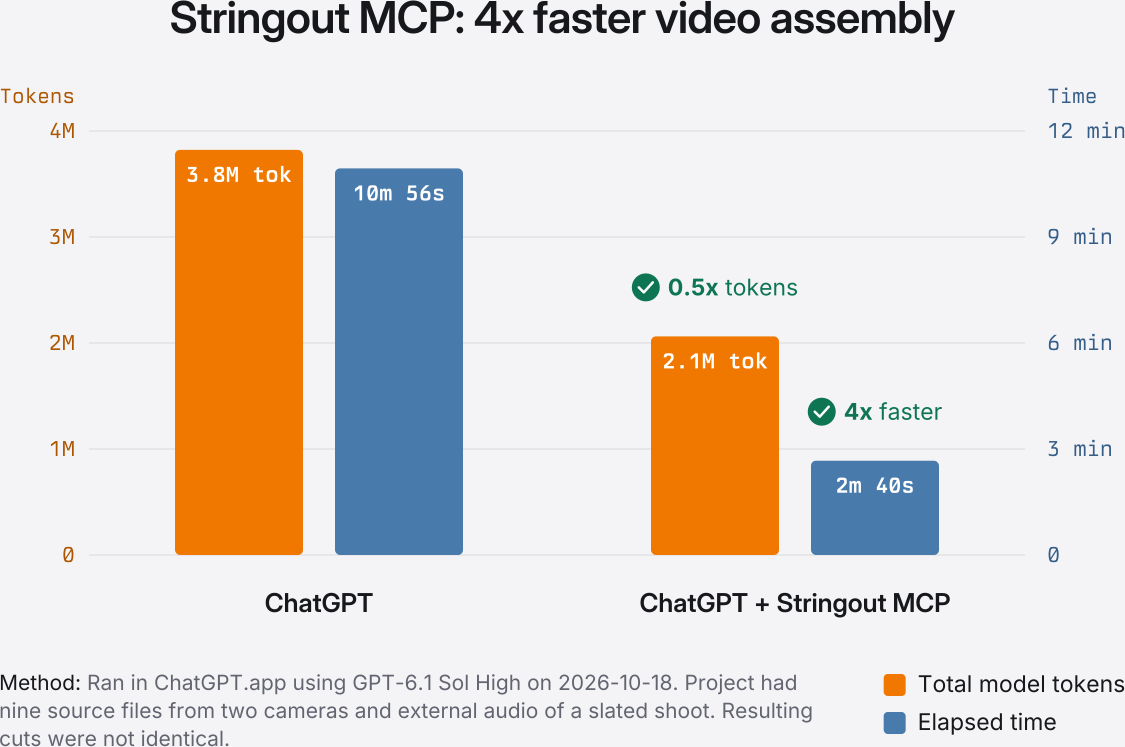
| Measurement | ChatGPT + Stringout MCP | ChatGPT |
|---|---|---|
| Total model tokens | 2,062,411 | 3,821,963 |
| Wall time | 2m 40s | 10m 56s |
| Tool calls | 53 | 62 |

03
Review the chat and timeline together
Review an AI video edit beside the chat in Stringout: see the source recordings, play and scrub the timeline, and check the ranges your agent selected. Ask for a separate revision while the earlier cut stays available. Supported MCP Apps hosts can also show the project in the conversation. In-chat playback depends on the host. Open the cut in Stringout when playback is unavailable there.
Compare source ranges on separate tracks and decide what to keep. With Stringout Pro, open the reviewed cut in Adobe Premiere Pro, DaVinci Resolve or Final Cut Pro to continue editing. The NLE project preserves the original source’s identity. Keep the media available to the editor.
Some NLE handoffs use HEVC edit media while preserving the original source’s identity. Use the camera originals for finishing.

The result
The next conversation starts with your production context
Keep the indexed sources, evidence and named cut revisions in Stringout. Your agent can retrieve them when work resumes, and you can watch the cut, inspect its source ranges and decide what changes next.
Start for free

